React Router DOM Route Parameters
Learning objective: By the end of this lesson, students will be able to define and access URL parameters with React Router.
Route parameters in React Router
At the moment, our application has static paths like / or /pokemon. In this section, we’ll introduce dynamic segments to our URLs, enabling paths like /pokemon/1. To do so, we’ll make use of route parameters, as well as a special hook for accessing route parameters in React Router.
Route parameters are dynamic segments of a URL, used to store data within the URL path. In React Router, these parameters allow our applications to dynamically display content based on the current URL. In our app, we’ll store the _id of a pokemon in the URL, and access this _id to render the corresponding pokemon on its own page.
Create dynamic links
First, let’s turn each pokemon name into a clickable link within the <PokemonList />.
Import the Link component at the top of PokemonList.jsx:
// src/components/PokemonList/PokemonList.jsx

import { Link } from 'react-router';
Next, wrap the text content of the <li> with a <Link>:
// src/components/PokemonList/PokemonList.jsx

          <li key={currentPokemon.name}>
            <Link to={`/pokemon/${currentPokemon._id}`}>
              {currentPokemon.name}
            </Link>
          </li>
Notice how we have defined the value of the to prop here. With this, each <Link> receives a dynamically generated path (/pokemon/2 for example).
Gotta catch ‘em all route
At this point, clicking on one of these links will result in a blank page underneath the app-wide “Pokemon!” header. This is because none of the routes defined in the <Routes> component match the pattern of /pokemon/id, and you’ll see a warning in the browser console letting us know what’s going wrong.
To prevent this behavior, you can define a default route inside the App.jsx <Routes> component, and add it to the bottom of the list of <Route> components:
// src/App.jsx

      <Routes>
        <Route path='/' element={<h2>Home Page</h2>} />
        <Route path="/pokemon" element={<PokemonList pokemon={pokemon} />} />
        {/* New, catch-all default route */}
        <Route path="*" element={<h2>Whoops, nothing here!</h2>} />
      </Routes>
Defining dynamic routes
Next, we’ll create a route that matches these dynamic links. For this, we’ll also need a new component that renders the details of a single pokemon.
Create a new component called PokemonDetails:
mkdir src/components/PokemonDetails
touch src/components/PokemonDetails/PokemonDetails.jsx
Add the following to src/components/PokemonDetails/PokemonDetails.jsx:
// src/components/PokemonDetails/PokemonDetails.jsx

const PokemonDetails = (props) => {
  // Always verify that any props are being passed correctly!
  console.log(props);

  return (
    <>
      <h2>Pokemon Details</h2>
      <dl>
        <dt>Weight:</dt>
        <dd></dd>
        <dt>Height:</dt>
        <dd></dd>
      </dl>
    </>
  );
};

export default PokemonDetails;
Import the new component at the top of src/App.jsx:
import
// src/App.jsx

import PokemonDetails from './components/PokemonDetails/PokemonDetails';
And finally, update the <Routes/> component of the <App/> component like so:
// src/App.jsx

      <Routes>
        <Route path='/' element={<h2>Home Page</h2>} />
        <Route path="/pokemon" element={<PokemonList pokemon={pokemon} />} />
        {/* New route to view a specific pokemon */}
        <Route
          path="/pokemon/:pokemonId"
          element={<PokemonDetails pokemon={pokemon} />}
        />
        <Route path="*" element={<h2>Whoops, nothing here!</h2>} />
      </Routes>
Take a moment to review the syntax of our new dynamic <Route>.
In React Router, route parameters are defined in the path using a : symbol. Here, we have defined a pokemonId route parameter. When a user selects a pokemon link, the URL changes to include that pokemon’s _id_, which is captured by the pokemonId parameter.
In short, this new <Route> tells React Router to render <PokemonDetails /> for URLs following the pattern /pokemon/1, /pokemon/2, /pokemon/3, etc.
💡 Notice how we passed the whole
pokemonarray to<PokemonDetails />. In the next section, we’ll use this array combined with ourpokemonIdroute parameter to locate and render a specific pokemon in the array.
Accessing dynamic parameters with useParams()
With the route in place, you should now be able to navigate to the details page.
Notice the _id value stored in the URL bar of the details page. We’ll need this value to find a specific pokemon object in the props.pokemon array. To do so, we’ll make use of React Router’s useParams() hook.
The useParams() hook returns an object with properties for each route parameter in the current URL. With this hook, we can store data in the URL, and extract it for use in a component.
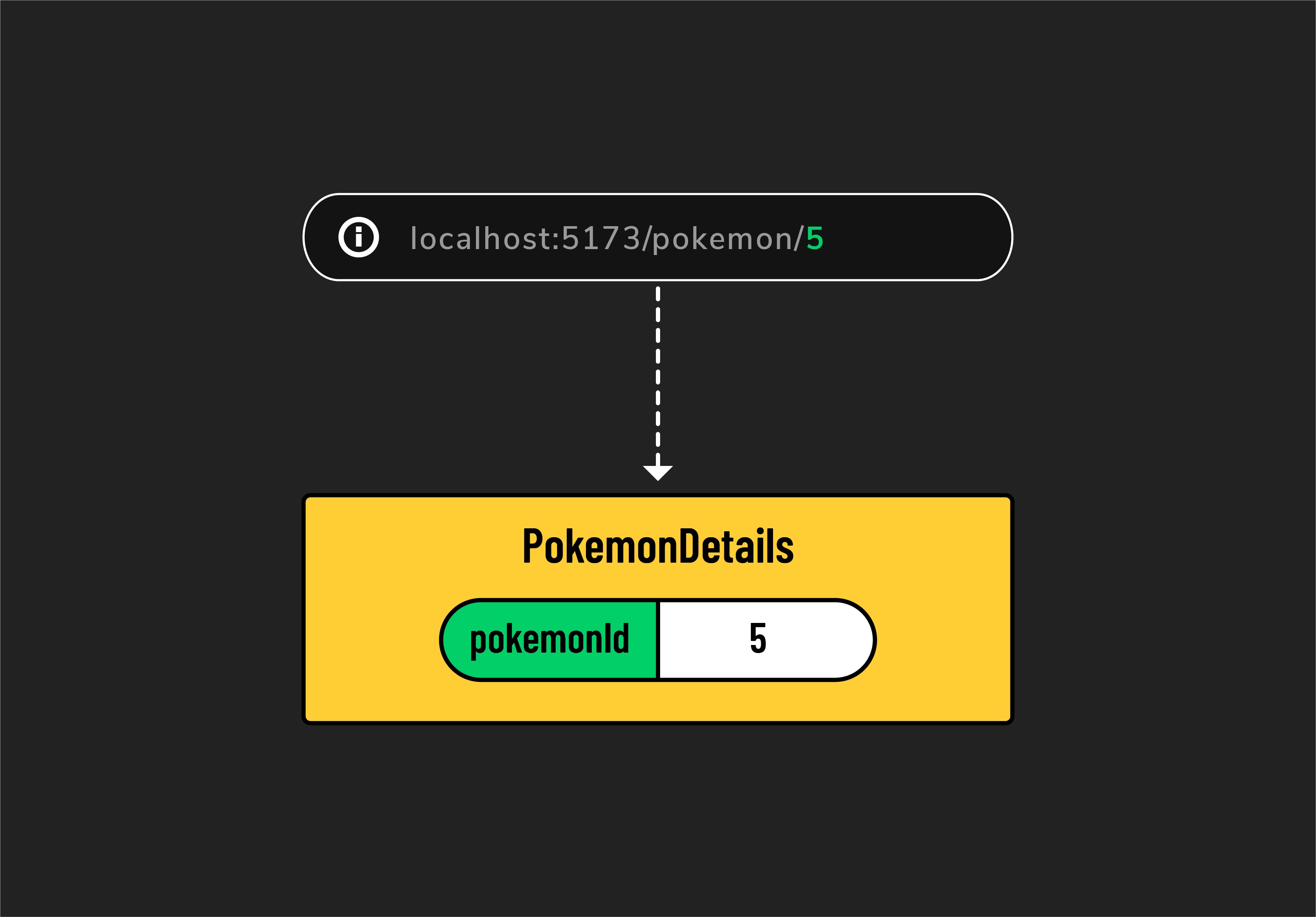
The hook can be applied in a component like this:
const params = useParams();
console.log(params);
In PokemonDetails.jsx, the object returned from useParams() might look like this:
{
  pokemonId: '1';
}
Additionally, the useParams() hook can take advantage of object destructuring:
const { pokemonId } = useParams();
console.log(pokemonId); // Expected output: '1'
Let’s apply this pattern in PokemonDetails.jsx.
Add the following import at the top of src/App.jsx:
// src/components/PokemonDetails/PokemonDetails.jsx

import { useParams } from 'react-router';
And add the following lines to the component before the return value:
// src/components/PokemonDetails/PokemonDetails.jsx

const { pokemonId } = useParams();
console.log('pokemonId:', pokemonId);
Try navigating to the details page once again, and verify that you are able to access the pokemonId route parameter.
Rendering the data
Our last task is to find() a specific pokemon in the props.pokemon array using the extracted pokemonId.
Update the main function of PokemonDetails.jsx with the following:
// src/components/PokemonDetails/PokemonDetails.jsx

  // Existing code
  const { pokemonId } = useParams();
  console.log('pokemonId:', pokemonId);

  // New code: Find a single pokemon object from the array of pokemon
  //           using the pokemonId from the URL params.
  const singlePokemon = props.pokemon.find((poke) => (
    poke._id === Number(pokemonId)
  ));
  console.log('Pokemon Object:', singlePokemon)
Note the use of the Number function to ensure the route parameter is typecast from its original String data type to the Number type we expect an _id property to have. Route parameters will always start with a String datatype, so be careful when making comparisons with them!
Once you verify the singlePokemon data, update the return with the following:
// src/components/PokemonDetails/PokemonDetails.jsx

  return (
    <>
      <h2>{singlePokemon.name}</h2>
      <dl>
        <dt>Weight:</dt>
        <dd>{singlePokemon.weight}</dd>
        <dt>Height:</dt>
        <dd>{singlePokemon.height}</dd>
      </dl>
    </>
  );
Test this functionality in your browser. When you click on a link, you should see details on the corresponding pokemon.