Hoot Front-End Update and Delete Comments
Learning objective: By the end of this lesson, students will be able to build functionality for updating and deleting comments.
Overview
In this lesson, we’ll add the functionality for updating and deleting comments. We’ll task you with implementing the solution for a few portions of this lesson. This will act as a great opportunity to reinforce your understanding of React. But don’t worry; much of the code you’ll write will mirror patterns seen elsewhere in this application. Be sure to reference the relevant lessons when necessary.
🚨 Note: This lesson assumes that you have completed the steps for updating and deleting comments within your back-end API.
Deleting Comments
Start by implementing the functionality for deleting a comment. This should be a bit easier than handling updates. It will also provide you with several pieces of code that can apply to updates.
🎓 You Do: Add the ‘Delete’ <button> for comments
The first step is addressing the UI elements that will trigger the request. In the case of deleting comments, this means adding a ‘Delete’ <button> to each comment in the HootDetails component.
Take a look at the code used to render ‘Edit’ and ‘Delete’ elements for a hoot:
// src/components/HootDetails/HootDetails.jsx

        {hoot.author._id === user._id && (
          <>
            <Link to={`/hoots/${hootId}/edit`}>Edit</Link>

            <button onClick={() => props.handleDeleteHoot(hootId)}>
              Delete
            </button>
          </>
        )}
You’ll want to mimic this approach for deleting and updating comments.
Take a look at the code block below for reference on where these elements should be placed:
// src/components/HootDetails/HootDetails.jsx

        {hoot.comments.map((comment) => (
          <article key={comment._id}>
            <header>
              <p>
                {`${comment.author.username} posted on
                ${new Date(comment.createdAt).toLocaleDateString()}`}
              </p>
              {/* Add the edit and delete UI here */}
            </header>
            <p>{comment.text}</p>
          </article>
        ))}
🏆 Be sure to include conditional rendering based on the authorship of a
comment!
🎓 You Do: Build the handleDeleteComment() function
Next, you’ll want to add a handleDeleteComment() function to the HootDetails component.
The function should accept a commentId, call a deleteComment() service function, and filter hoot state accordingly. Don’t worry about the deleteComment() service function for now; we’ll address that in the next step.
-
Start by building the scaffolding for the function, updating the ‘Delete’ button’s event handler, and confirming that you have access to the
commentIdwithinhandleDeleteComment:// src/components/HootDetails/HootDetails.jsx const handleDeleteComment = async (commentId) => { console.log('commentId:', commentId); }; -
With access to the
commentId, you should be able tofilter()local state:// src/components/HootDetails/HootDetails.jsx const handleDeleteComment = async (commentId) => { console.log('commentId:', commentId); // Eventually, the service function will be called here setHoot({ ...hoot, comments: hoot.comments.filter((comment) => comment._id !== commentId), }); };
🚨 Remember, we’ll eventually need to update our database for these changes to persist!
🎓 You Do: Build the service function
Next, add a deleteComment() service function to src/services/hootService.js. Like createComment(), the deleteComment() function will utilize the same BASE_URL as other hoot and comment related services.
The service function should accept both a hootId and a commentId. Use previous service functions as a reference to help you build this out.
// src/services/hootService.js

const deleteComment = async (hootId, commentId) => {
  // You've got this!
};
💡 Check your back-end routes if you have trouble with this step. Based on the structure of previous service functions, making a request to
${BASE_URL}/${hootId}/comments/${commentId}would be appropriate.
🎓 You Do: Call the service
With the service in place, return to the HootDetails component to finish up your handleDeleteComment() function.
// src/components/HootDetails/HootDetails.jsx

  const handleDeleteComment = async (commentId) => {
    console.log('commentId:', commentId);
    // call  hootService.deleteComment here!
    setHoot({
      ...hoot,
      comments: hoot.comments.filter((comment) => comment._id !== commentId),
    });
  };
💡 When calling
hootService.deleteComment(), remember to pass inhootIdandcommentId.
After completing this step you should be able to delete comments! 🎉
Updating comments
The functionality for updating comments will mirror that of updating hoots quite closely. Be sure to review that lesson before moving on.
As we saw with updating hoots, the same form component can be used to create and update a resource. We’ll take the same approach with our CommentForm component.
Take a look at the diagram below for context on how the CommentForm used to update comments will fit into our component tree:
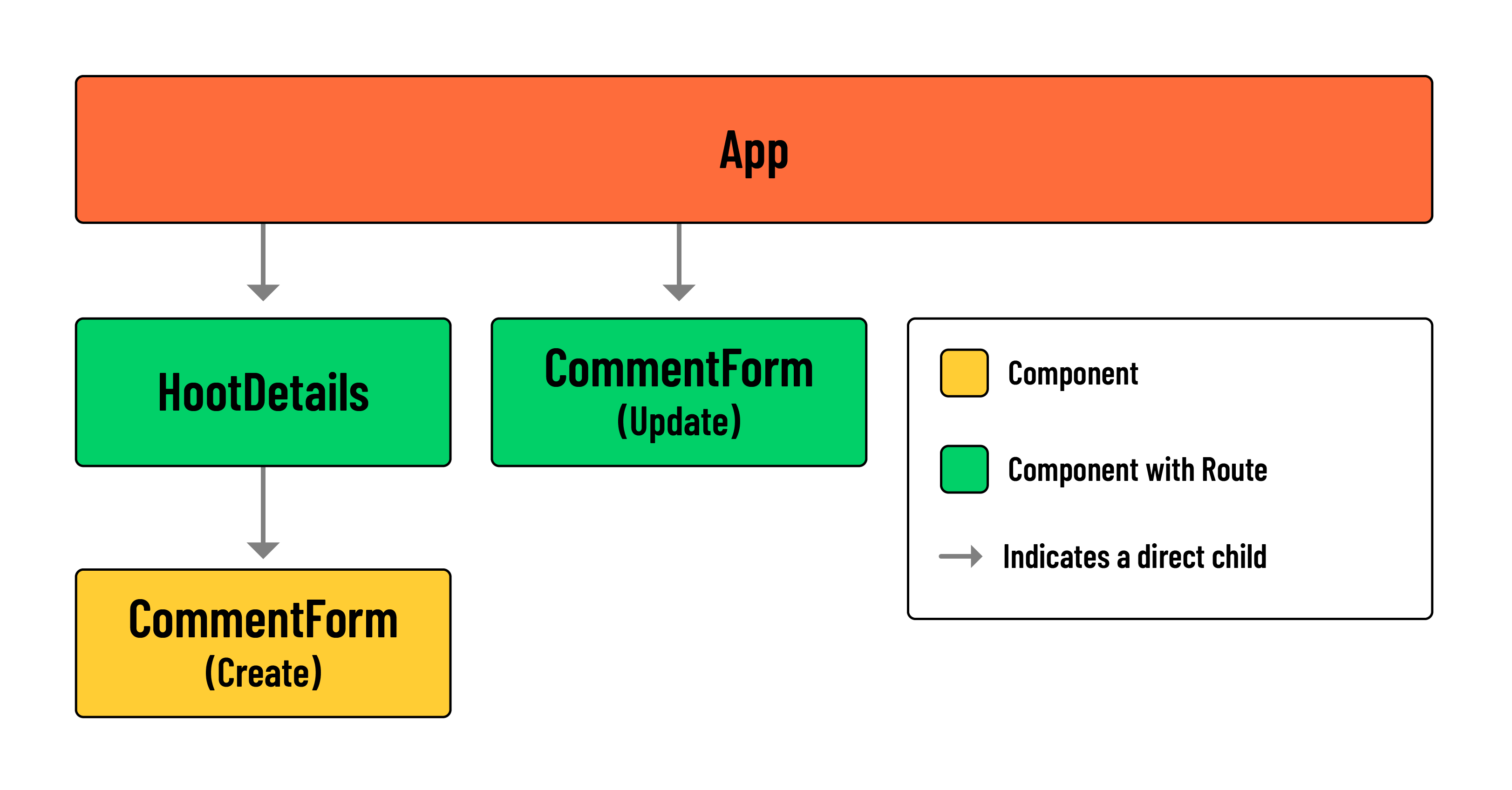
💡 Notice how one instance of
CommentFormis treated as a standard child component while the other is treated as a ‘page’ with its own route.
🎓 You Do: Add the ‘Edit’ <Link> for comments
As always, start with the UI element.
In the HootDetails component, add an ‘Edit’ <Link> that directs a user to the ‘Edit Comment’ page. The <Link> should be placed directly above the ‘Delete’ comment <button>.
The to prop of your <Link> should have the following value:
`/hoots/${hootId}/comments/${comment._id}/edit`;
After you add the <Link>, head to the App component and build the corresponding client-side route.
-
Remember to import the component inside
src/App.jsx:// src/App.jsx import CommentForm from './components/CommentForm/CommentForm'; -
And add a new protected route:
// src/App.jsx

<Route
  path='/hoots/:hootId/comments/:commentId/edit'
  element={<CommentForm />}
/>
💡 Notice the inclusion of
:hootIdand:commentId. These parameters will be necessary for the next step.
In the next section, we’ll access the value of this hootId parameter with the useParams() hook.
Modify the CommentForm
Next, we’ll need to modify the CommentForm component so that it can be used in two different contexts (creating comments and updating comments).
-
Import
useParamsanduseNavigatefromreact-routerin theCommentFormcomponent:// src/components/CommentForm/CommentForm.jsx import { useParams, useNavigate } from 'react-router'; -
Within the component, call
useParams()to access thehootIdand thecommentId:// src/components/HootForm/CommentForm.jsx const { hootId, commentId } = useParams(); console.log(hootId, commentId); -
With a
console.log(), verify that you can access the parameters using the newEditlink.
Set formData state
Next, we’ll use the parameters from the step above to fetch the necessary data for formData state.
Our back-end does not have a dedicated controller for retrieving a specific comment, but the existing show functionality for hoots should work well in this scenario.
Within a useEffect, we can call hootService.show(). The hoot object issued as a response will contain the comment we need, which can be located by calling the find() method on hoot.comments. The resulting comment data can be stored in formData state.
-
Add imports for
hootServiceanduseEffectin theCommentFormcomponent:// src/components/CommentForm/CommentForm.jsx import { useState, useEffect } from 'react'; import { useParams, useNavigate } from 'react-router'; import * as hootService from '../../services/hootService'; -
Add the following
useEffect():// src/components/CommentForm/CommentForm.jsx useEffect(() => { const fetchHoot = async () => { const hootData = await hootService.show(hootId); // Find comment in fetched hoot data setFormData(hootData.comments.find((comment) => comment._id === commentId)); }; if (hootId && commentId) fetchHoot(); }, [hootId, commentId]);💡 Note the above
ifcondition and inclusion ofhootIdandcommentIdin our effect’s dependency array. Our effect will only callfetchHootif both of these pieces of data are present. Otherwise, we can assume the component is being used to create a brand new comment, in which caseformDatastate should maintain its initial value. -
Take a moment to confirm that the initial state of
formDatais correctly set editing a comment.
Build the service function
Next, we’ll build the updateComment() service function.
Our updateComment() service function will accept three parameters:
hootIdto locate the parent document.commentIdto locate the embedded subdocument.commentFormDatato update the properties of the embedded subdocument.
Add the following to src/services/hootService.js:
// src/services/hootService.js

const updateComment = async (hootId, commentId, commentFormData) => {
  try {
    const res = await fetch(`${BASE_URL}/${hootId}/comments/${commentId}`, {
      method: 'PUT',
      headers: {
        Authorization: `Bearer ${localStorage.getItem('token')}`,
        'Content-Type': 'application/json',
      },
      body: JSON.stringify(commentFormData),
    });
    return res.json();
  } catch (error) {
    console.log(error);
  }
};

export {
  index,
  show,
  create,
  createComment,
  deleteHoot,
  update,
  deleteComment,
  // export
  updateComment,
};
Call the service
This function handles both adding and updating comments, so we’ll need an if...else block to decide which action to take:
-
The
ifcondition should check if bothhootIdandcommentIdare present:- If both are available, call
hootService.updateCommentto update the comment andnavigate()to redirect the user back to/hoots/${hootId}. - If either
hootIdorcommentIdis missing, callprops.handleAddComment(formData)to add a new comment without redirecting.
- If both are available, call
When a comment is updated, the user is redirected to the hoot’s ‘Details’ page. This triggers the hootService.show(hootId) function to run again, updating the state with the latest data from the back-end.
Because of this automatic state update, you don’t need to manually update the state when a comment is edited. Additionally, the updateComment() service can be called directly inside the handleSubmit() function in the CommentForm component.
-
First, let’s import the
useNavigate()hook fromreact-router. This will allow us to redirect a user back to thehootDetailspage. Within the component, add:// src/components/HootForm/CommentForm.jsx const navigate = useNavigate(); -
In the
CommentFormcomponent, update thehandleSubmit()function with the following:// src/components/CommentForm/CommentForm.jsx const handleSubmit = (evt) => { evt.preventDefault(); if (hootId && commentId) { hootService.updateComment(hootId, commentId, formData); navigate(`/hoots/${hootId}`); } else { props.handleAddComment(formData); } setFormData({ text: '' }); };
You should now be able to update comments!