Data Structures Lists
Learning objective: By the end of this lesson, students will be able to create and manipulate lists in Python.
What are lists?
Lists serve the same function in Python as arrays do in JavaScript. A list holds zero or more items called elements - just like arrays in JavaScript.
Lists can contain any data type - strings, integers, dictionaries, nested lists, and so on. They grow and shrink in size dynamically. You can add to them without being concerned about their capacity. They have a class (type) of list.
Basic syntax
Like arrays in JavaScript, a list can be created with a set of square brackets:
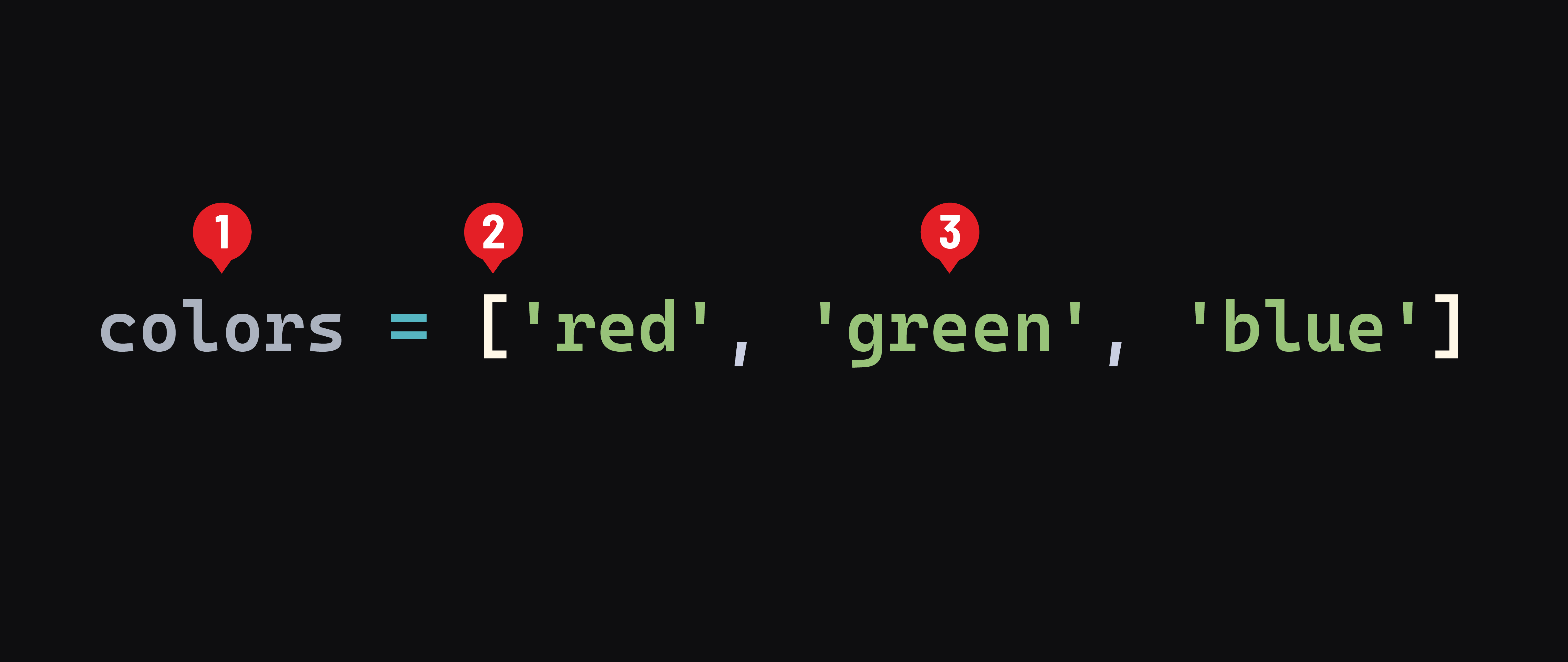
- The name of the list. This should be plural because it holds a collection of elements.
- Opening and closing square brackets indicate a list.
- The list’s elements are placed inside the square brackets, separated by a comma. When initializing a list, you don’t have to include elements; use a set of empty square brackets -
[].
Lists are considered a sequence type in Python.
📚 A sequence is a generic term for an ordered collection. Other sequence types in Python include strings and tuples.
Like JavaScript arrays, Python lists use zero-based indexing, meaning that the first element in the list is at index position 0.
Accessing items
Accessing the individual items of a list is much like accessing elements in a JavaScript array. Use square brackets with an expression that evaluates to an integer to access the element at that index:
print(colors[0])
# prints: red
However, unlike in JavaScript, we can use negative integers to index from the end of a list:
print(colors[-1])
# prints: blue
This means you don’t need to get the length of a list (for example, with len(colors)) to find the end of a list. There’s no need to write code like colors[len(colors) - 1] - yay!
Mutation
Lists are mutable:
- Existing items within a list can be replaced.
- Additional items can be added to the list.
- Existing items can be removed from a list.
Assigning items
We also use square brackets to target an item of a list for assignment:
colors[-1] = 'brown'
print(colors)
# prints: ['red', 'green', 'brown']
Unlike with JavaScript arrays, assigning to a non-existing index results in an error:
colors[10] = 'yellow'
# error: IndexError: list assignment index out of range
Adding an item
The equivalent to JavaScript’s push() method is append():
colors.append('purple')
print(colors)
# prints: ['red', 'green', 'brown', 'purple']
# purple was added to the end of the list
However, unlike JavaScript’s push() method, append() can only add one item and does not return a value.
For adding multiple items, use the extend():
colors.extend(['orange', 'black'])
print(colors)
# prints: ['red', 'green', 'brown', 'purple', 'orange', 'black']
# orange and black were added to the end of the list
Inserting an item
To add an item anywhere within a list, use the insert() method:
colors.insert(1, 'yellow')
print(colors)
# prints: ['red', 'yellow', 'green', 'brown', 'purple', 'orange', 'black']
# yellow was added at the 1 index; no elements were replaced
Removing an item
Python lists have a pop() method, but it’s more flexible in Python because you can specify the index of the item to remove and return:
green = colors.pop(2)
print(colors)
# prints: ['red', 'yellow', 'brown', 'purple', 'orange', 'black']
# green was removed at the 2 index and is in the green variable
There’s also a remove() method that removes the first item that matches what you pass in:
colors.remove('orange')
print(colors)
# prints: ['red', 'yellow', 'brown', 'purple', 'black']
No value is returned by the remove() method.
Clearing an entire list
The clear() method empties a list:
colors.clear()
print(colors)
# prints: []
Iterating over items in a list
The for in loop is used to iterate over the items in a list:
colors = ['red', 'green', 'blue']
for color in colors:
    print(color)
    # prints:
    # red
    # green
    # blue
If we need to access the index of the item while iterating over a list, we use the built-in enumerate() function to provide the index and the value to a for loop:
for idx, color in enumerate(colors):
    print(idx, color)
    # prints:
    # 0 red
    # 1 green
    # 2 blue