Data Structures Dictionaries
Learning objective: By the end of this lesson, students will be able to understand the concept of dictionaries in Python, differentiate them from other data structures, and demonstrate how to create and manipulate dictionaries.
What are dictionaries?
Dictionaries in Python are similar to objects in JavaScript. Dictionaries are collections of items, like objects, which are collections of properties in JavaScript.
Dictionaries have a class (type) of dict.
Basic syntax
As with objects in JavaScript, a dictionary literal is created using curly braces:
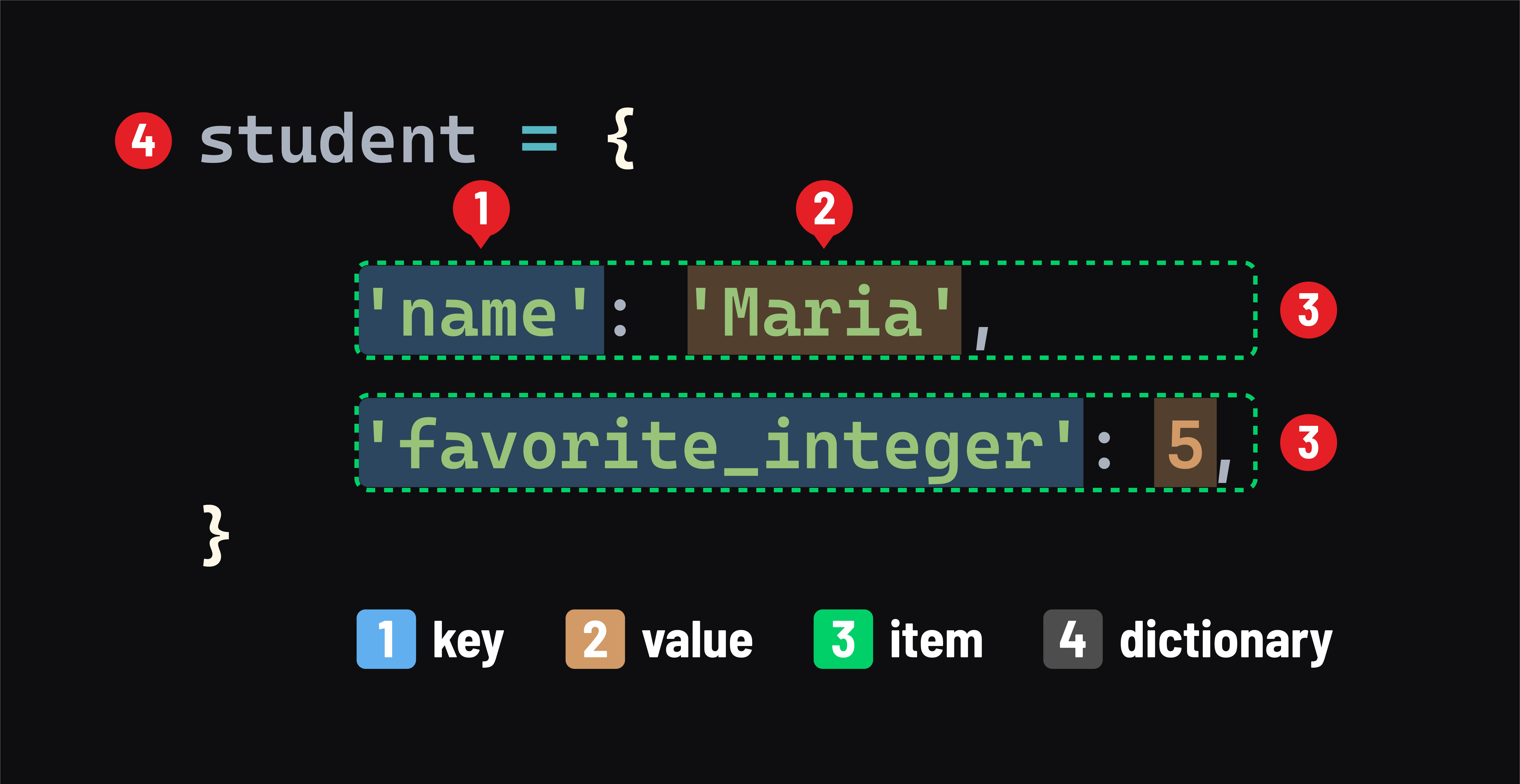
- A key
- A value
- An item - or a
key: valuepair - The dictionary itself
Any immutable type (like a number) can be used as a key. Unlike in JavaScript, when strings are used as keys, they must be surrounded in quotes, as they are above. The value held by a variable can also be used as a key - this is a common pitfall for JavaScript developers new to Python:
favorite_animal = 'dog'

student = {
    'name': 'Maria',
    'favorite_integer': 5,
    favorite_animal: 'llama' # notice the lack of quotes around favorite_animal
}

print(student)
# prints: {'name': 'Maria', 'favorite_integer': 5, 'dog': 'llama'}
# note the 'dog' key - the value of the favorite_animal variable is used
Accessing items in dictionaries
Getting values
We use square brackets to get an item’s value:
name = student['name']
print(name)
# prints: Maria
Unlike JavaScript, we can’t access items in a Python dictionary using dot notation (dots are exclusively used to invoke methods on a dictionary in Python).
The get method
When attempting to access a key that does not exist in a dictionary, a KeyError will be raised.
One option to avoid this error is to use the get method:
favorite_food = student['favorite_food']
# error: KeyError: 'favorite_food'

print(student.get('favorite_food'))
# prints: None
The in operator
Another way to avoid the KeyError is to use the in operator to check if the dictionary includes a key:
if 'course' in student:
    print(f"{student['name']} is enrolled in {student['course']}")
else:
    print(f"{student['name']} is not enrolled in a course")
    # prints: Maria is not enrolled in a course
Mutation
Dictionaries are mutable:
- The values assigned to a key can be changed.
- Additional items can be added.
- Existing items can be deleted.
Setting items
We not only use square brackets to get an item’s value - we also use it to set an item’s value:
student['name'] = 'Mariana'
print(student['name'])
# prints: Mariana
Adding items
Assigning to a key that does not exist will create a new item in the dictionary.
Let’s add an item to the student dictionary:
student['age'] = 25
Deleting items
The del statement is used to delete an item from a dictionary:
del student['dog']
# verify that the item was deleted
print('dog' in student)
# prints: False
Number of items
Use the built-in len function to retrieve the number of items in a dictionary:
print(student)
# prints: {'name': 'Maria', 'favorite_integer': 5, 'age': 25}
print(len(student))
# prints: 3
print(len({}))
# prints: 0
Iterating through dictionaries
for loops are used to iterate over the items in a dictionary.
However, accessing the value of an item as follows is considered to be a Python anti-pattern:
for key in student:
    print(f"{key} is {student[key]}")
    # prints:
    # name is Maria
    # favorite_integer is 5
    # age is 25
Modifying a dictionary using this approach can lead to potential issues, which is why this is not preferred.
The preferred approach is to use the items() method to obtain a dictionary view object.
Use it in a for in loop to iterate over the view object:
for key, val in student.items():
    print(f"{key} is {val}")
    # prints:
    # name is Maria
    # favorite_integer is 5
    # age is 25
The for statement assigns values to multiple variables like with key, val above through a mechanism called tuples, discussed later.
🎓 You Do
- Define a Python dictionary named
where_my_things_arecontaining a few items where:- the
keysare things you have - the
valuesare the locations where you keep those things
- the
-
Write a
forloop that iterates over the items in the dictionary and prints each one as:My [thing] is kept [location]