MEN Stack Relating Data Lab Cookbook Exercise: Embedding Related Data
Introduction
In this lab you’ll create the Cookbook app, a dynamic pantry manager for cooking enthusiasts! For this exercise, you’ll be practicing embedding a new data schema within a user model. Users will have the power to perform full CRUD operations to manage their pantry items with ease. They’ll also have the opportunity to explore other users’ pantries, drawing inspiration and sharing their love for cooking.
MVP: Your task is to perform full crud on items in a User’s pantry - an embedded data schema on the user model.
User stories and application planning
Use the following user stories to guide the functionality and features of your application:
- As a User (AAU), I want to sign up for an account and sign in, so that I can access my personal user profile and manage my pantry.
- AAU, I want an easy and consistent way to navigate through the site, whether I am signed in or not. I need to quickly access options to sign up, sign in, view my pantry, or sign out, depending on my current status.
- AAU, I need a dedicated page to view all items in my pantry, to easily manage and review what I have stored.
- AAU, I want to easily find and click on an ‘Add New Item’ link, which takes me to a form for adding new items to my pantry
- AAU, after filling out the pantry item form, I want to submit it and receive confirmation that the item has been saved in my pantry.
- AAU, I need the ability to edit and delete items in my pantry, allowing me full control over managing my stored items.
- AAU, I am interested in viewing a list of all other app users, to foster a sense of community and interaction within the app.
- AAU, I want the option to click on another user’s profile and view all the items in their pantry, to exchange ideas or find inspiration for my own pantry.
Data modeling and ERD
Your task is to create a Pantry, an embedded array within the User model. This array represents the user’s collection of food items. Because the pantry holds foods, the name of our schema will be foodSchema.
Create the Food schema
Each user’s pantry will contain an array of foods, each defined by a simple schema:
| Property | Type | Required |
|---|---|---|
| name | String | true |
Begin by defining foodSchema in the user model file using the new mongoose.Schema method. Include the necessary properties for food items.
// user.js

const foodSchema = new mongoose.Schema({
  // YOU DO: Define properties of food schema
});
Embed foodSchema in userSchema
Next, modify userSchema to include the foodSchema. Do this by adding a property named pantry. This property will utilize the foodSchema to represent a list of food items associated with a user.
const userSchema = new mongoose.Schema({
  username: {
    type: String,
    required: true,
  },
  password: {
    type: String,
    required: true,
  },
  pantry: // YOU DO: embed foodSchema here
});
Take at look at this ERD (Entity-Relationship Diagram) to help you visualize the relationships between these entities, User and foodSchema:
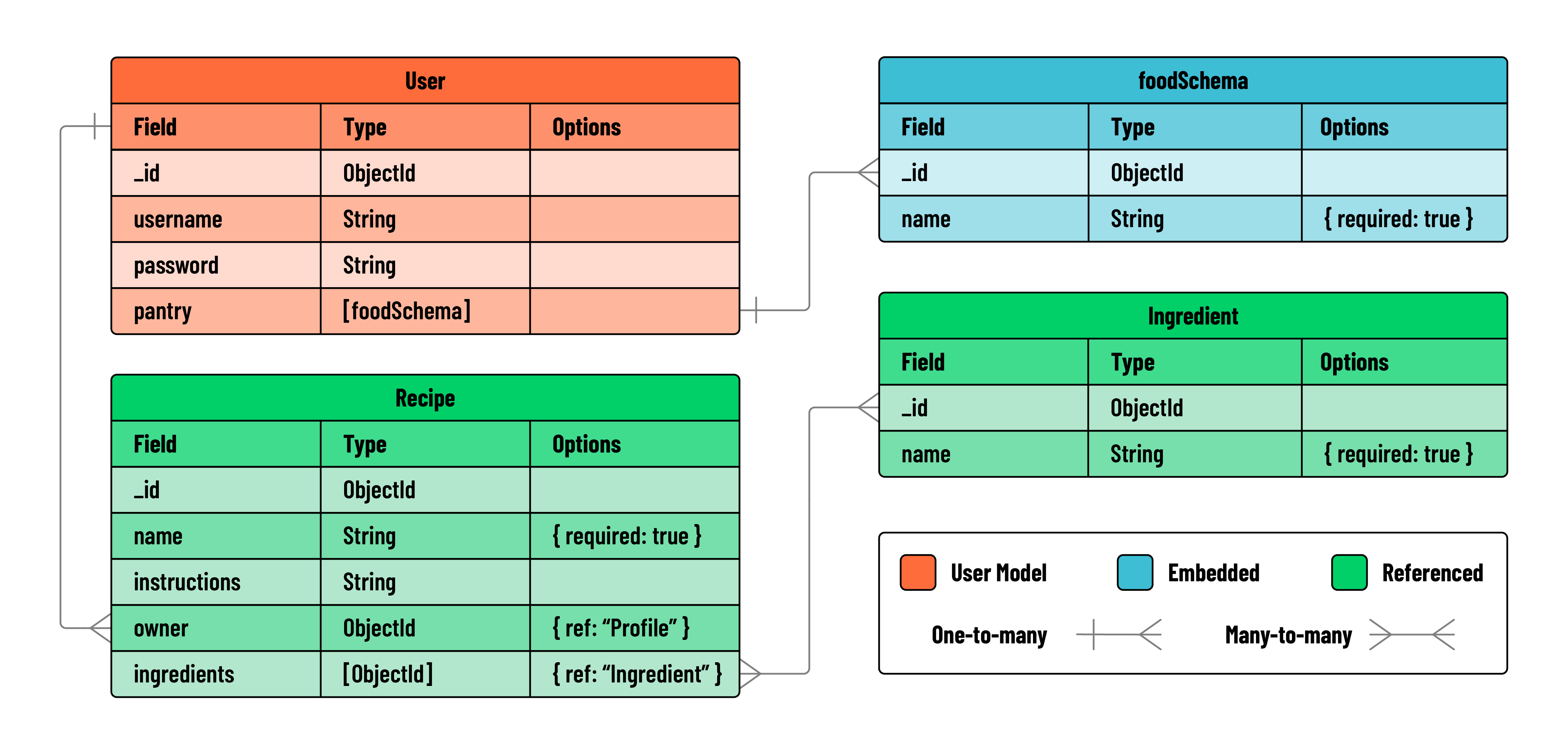
For this exercise, you can ignore the schemas for recipe and ingredient. Additional sections of this lab explore relating data using referencing.
RESTful routes for managing data
Reference this chart when building your RESTful routes in your controller.
| Action | Route | HTTP Verb |
|---|---|---|
| Index | ‘/users/:userId/foods’ | GET |
| New | ‘/users/:userId/foods/new’ | GET |
| Create | ‘/users/:userId/foods’ | POST |
| Show | ‘/users/:userId/foods/:itemId’ | GET |
| Edit | ‘/users/:userId/foods/:itemId/edit’ | GET |
| Update | ‘/users/:userId/foods/:itemId’ | PUT |
| Delete | ‘/users/:userId/foods/:itemId’ | DELETE |
Because this data is embedded in the user model, our routes are structured to reflect that relationship.
Structure and Setup
1. Build the controller
- Create a file called
foods.jsin the controllers directory. - Require all essential modules at the top of
foods.js - Export your router for use in
server.js
// controllers/foods.js

const express = require('express');
const router = express.Router();

const User = require('../models/user.js');

// router logic will go here - will be built later on in the lab

module.exports = router;
2. Use the controller in server
- Import the foods controller in
server.js. - Use middleware to direct incoming requests to
/users/:userId/foodsto the foods controller.
// server.js

const authController = require('./controllers/auth.js');
const foodsController = require('./controllers/foods.js');
// server.js

app.use('/auth', authController);
app.use('/users/:userId/foods', foodsController);
Add middleware
Now you’ll need to add two middleware functions to your application:
- one that restricts access to logged-in users only
- one that makes the user object available to view templates via
res.locals.
Create a middleware folder in your project root. Inside this folder:
Create a file named is-signed-in.js.This function should:
- include logic that checks if
req.session.userexists. - If it does, allows the request to continue on the normal chain by invoking
next() - If a user session does not exist, the user should be redirected to the sign in page.
// middleware/is-signed-in.js

const isSignedIn = (req, res, next) => {
  if (req.session.user) return next();
  res.redirect('/auth/sign-in');
};

module.exports = isSignedIn;
Create a file named pass-user-to-view.js in the same middleware folder. This function should:
- include logic that assigns
req.session.usertores.locals.user(available in our views). - If no user is found, we set it to
null. Then allow the request to continue on the normal chain by invokingnext().
// middleware/pass-user-to-view.js

const passUserToView = (req, res, next) => {
  res.locals.user = req.session.user ? req.session.user : null;
  next();
};

module.exports = passUserToView;
Import and include both middleware functions above all of the routes and controllers in server.js..
// server.js
const isSignedIn = require('./middleware/is-signed-in.js');
const passUserToView = require('./middleware/pass-user-to-view.js');
These middleware functions should run before any routes that check for a valid user or require a user to be signed in to view a page.
For this application, users must be signed in to view any of the routes associated with their pantry. Therefore, isSignedIn should come above the foods controller, but not before auth.
app.use(passUserToView);
app.use('/auth', authController);
app.use(isSignedIn);
app.use('/users/:userId/foods', foodsController);
You are now ready to begin building your protected routes.
Build the nav partial
Implement the following user story:
AAU, I want an easy and consistent way to navigate through the site, whether I am signed in or not. I need to quickly access options to sign up, sign in, view my pantry, or sign out, depending on my current status.
Currently the links for “Sign up” or “Sign in” are hardcoded onto the homepage. You will need to refactor and move these links into a nav bar partial for a better user experience.
- Create a directory called
partialsinside theviewsdirectory. - Inside partials, create a new file called
_navbar.ejs
Create a nav inside _navbar.ejs:
- This nav should have a
homelink displayed on every page. - Other links should be rendered conditionally based on whether or not a
useris signed in. - If a
useris signed in, they should see links to “View my Pantry” or “Sign Out”. - If a
useris not signed in, they should see links to “Sign In” or “Sign Up”.
<nav>
  <a href="/">Home</a>
  <% if(user) { %>
  <a href="/users/<%=user._id%>/foods">View my Pantry</a>
  <a href="/auth/sign-out">Sign Out</a>
  <% } else { %>
  <a href="/auth/sign-in">Sign In</a>
  <a href="/auth/sign-up">Sign Up</a>
  <% } %>
</nav>
For the best user experience, you’ll want to include this nav partial at the top of all of your existing templates.
<%- include('./partials/_navbar.ejs') %>
With the nav partial included, you can now replace the hardcoded links on your homepage (views/index.ejs) with a partial and some simple welcome text.
<body>
  <%- include('./partials/_navbar.ejs') %>
  <h1>Welcome to CookBook</h1>
</body>
Build the index route
With the main structure of the application complete, it’s time to start building out the site pages guided by user stories.
1. Conceptualize the index route
For your landing page, you will use:
GET/users/:userId/foods
2. Define the index route
- In your
foodscontroller, create a newindexroute to serve as the landing page. - This route should
res.render()aindex.ejsview.
router.get('/', (req, res) => {
  res.render('foods/index.ejs');
});
3. Render the index template
-
Create a new directory called
foodsinside of theviewsdirectory. This will hold the templates for yourfoodspages. -
Create an
index.ejsfile infoods. Add a basic HTML boilerplate to this file.
<!DOCTYPE html>
<html lang="en">
  <head>
    <meta charset="UTF-8" />
    <meta name="viewport" content="width=device-width, initial-scale=1.0" />
    <title>My Pantry</title>
  </head>
  <body>
    <h1>Welcome to my Pantry</h1>
  </body>
</html>
Remember to insert your nav partial at the top of the body to keep the views consistent and create ease of navigation between pages. You’ll want to add this to all your new pages.
Test your new route in the browser to confirm that everything renders correctly (hint: use the route in your nav bar).
Build the new page
Implement the following user story:
AAU, I want to easily find and click on an ‘Add New Item’ link, which takes me to a form for adding new items to my pantry
1. Conceptualize the new route
For your new page, you will use:
GET/users/:userId/foods/new
2. Define the new route
This route will render a page that displays a form to add a new item to the user’s pantry.
- In
controllers/foods.js, create anewroute. - This route should
res.render()anew.ejsview. - Add a “Add New Item” link to the
indexpage and point it to your new route.
3. Render the new template
- Create a new template called
new.ejsin theviewsdirectory. - This view should display a form to add a new food item to the user’s pantry. Design your form based on the
foodschemadefined earlier. - The form action will
POSTto thecreateroute.
Build the create functionality
Implement the following user story:
AAU, after filling out the pantry item form, I want to submit it and receive confirmation that the item has been saved in my pantry.
1. Conceptualize the create route
This route will:
POSTto/users/:userId/foods
2. Define the create route
This route will create new foods in the embedded pantry array on the user model.
- Look up the user from
req.session - Push
req.body(the new form data object) to thepantryarray of the current user. - Save changes to the
user. - Redirect back to the application’s
indexview. - If any errors, log them and redirect back home
/.
Add pantry items to index page
Implement the following user story:
AAU, I need a dedicated page to view all items in my pantry, to easily manage and review what I have stored.
1. Build the index functionality
Refactor the index route to send all items in a user’s pantry to the index view:
- Look up the current user’s pantry
- Send all pantry items to the view via
res.locals - If any errors, log them and redirect back home
/.
2. Update the index template
- Use conditional rendering to display a list of pantry items or a message that reads “There are no items in this pantry.”
Build delete route
Implement the following user story:
AAU, I need the ability to edit and delete items in my pantry, allowing me full control over managing my stored items.
1. Conceptualize the delete route
This route will:
DELETEto/users/:userId/foods/:itemId- Add
?_method=DELETEto utilize the method override middleware
2. Define the delete route
- Define the
deleteroute in thefoodscontroller
3. Add delete link to the index template
- Add a simple form element to each pantry item that posts to the
deleteroute - The form should appear as a single
deletebutton in the UI
4. Build the delete functionality
This route will delete the food item from the user’s pantry.
- Look up the user from
req.session - Use the
.deleteOne()method to delete a food using the id supplied fromreq.params - Save changes to the
user - Redirect back to the
indexview - If any errors, log them and redirect back home
/.
Build the edit page
Implement the following user story:
AAU, I need the ability to edit and delete items in my pantry, allowing me full control over managing my stored items.
1. Conceptualize the edit route
For your edit page, you will use:
GET/users/:userId/foods/:itemId/edit
2. Define the edit route and build edit funtionality
This route will render a page that displays a form to edit a specific food item in the user’s pantry.
- In
controllers/foods.js, create an edit route. - Look up the user from
req.session - Find the current food from the id using
req.params - This route should
res.render()anedit.ejsview. - Send the current food to the view via
res.locals - If any errors, log them and redirect back home
/. - Back in the user’s index page, add an edit link to each food item rendered.
3. Render the edit template
- Create a new template called
edit.ejsin theviewsdirectory. - This view should display a form to edit a specific food item in the user’s pantry. Design your form based on the
foodschemadefined earlier. - Auto-fill the form with the
fooddata supplied from the route. - The form action will
POSTto theupdateroute.
Build the update functionality
1. Conceptualize the update route
This route will:
POSTto/users/:userId/foods/:itemId- Add
?_method=PUTto utilize the method override middleware
2. Define the update route
- Define the update route in the
foodscontroller
3. Build the update functionality
This route will update a specific food item from the user’s pantry:
- Find the user from
req.session - Find the current food from the id supplied by
req.params - Use the
.set()method, updating the current food to reflect the new form data onreq.body - Save the current
user - Redirect back to the
indexview - If any errors, log them and redirect back home
/.
Now that you have full crud functionality, test each route end to end and check for errors before moving on.
Add a Community page
There are two final user views to reach your final application. Building a community page for users to find each other and gain inspiration from the pantry items of others.
Implement the following user story:
AAU, I am interested in viewing a list of all other app users, to foster a sense of community and interaction within the app.
To meet this requirement you will need a new users controller and views directory for users.
- Create a simple
/userscontroller with anindexroute to get all users. - Connect your new controller in
server.js - Create a new directory inside of
viewscalledusers. - Add a new view called
index.ejs - Render a list of all users on the
indexpage. - Add a link to your nav partial that says “Explore Our Community”. Link it to your new community page.
View other users’ pantries
Implement the following user story:
AAU, I want the option to click on another user’s profile and view all the items in their pantry, to exchange ideas or find inspiration for my own pantry.
From the community page, users should be able to click on the names of other users and see their pantry. This requires one final route and view.
- Create a
showroute in your/userscontroller - Create a
show.ejsin theusersviews directory - Add a link for each user’s
showpage in the rendered community list. - On each user’s
showpage, render a list of that user’s pantry items. - This list should be read-only.
Test your new community page.