JavaScript Control Flow Looping
Learning objective: By the end of this lesson, students will be able to compose a for loop to repeat specific blocks of code.
Looping
Looping is a control flow mechanism that repeats a set of actions. In programming, these actions are typically code blocks, and they are repeated either until a certain condition is no longer met (while the condition is true) or a specific number of times (for a certain number of iterations). This process is especially crucial when dealing with collections of data, such as arrays or lists, where you might need to examine or manipulate each element in the collection.
for
A for loop repeats until a specific condition evaluates to false. for loops are commonly used to run a block of code a specified number of times. The syntax is as follows:
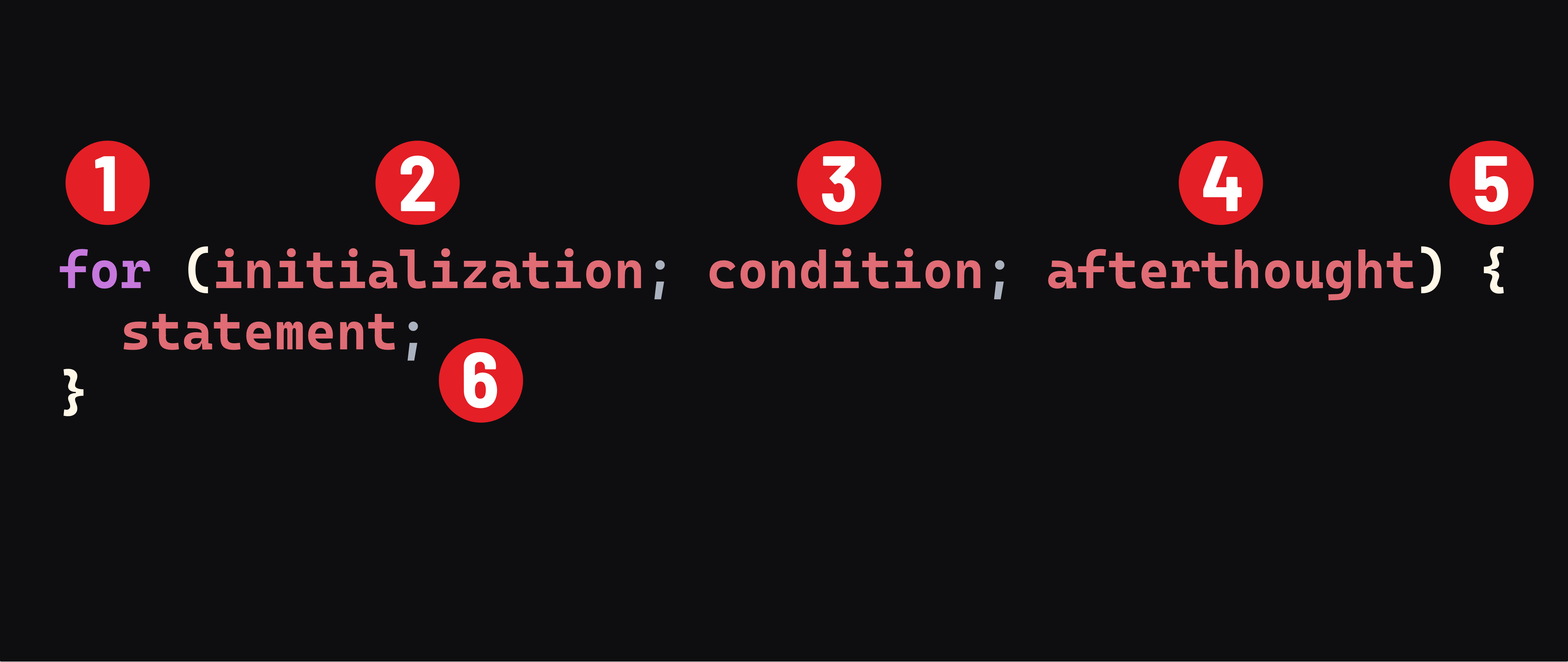
- The
forkeyword. This keyword starts aforloop, signaling the beginning of a block of code that will repeat a set of actions. initialization- An expression or variable declaration evaluated once before the loop begins. This is where you set up your loop counter. It is evaluated only once at the very start of the loop. For instance,let i = 0;initializes a counter variableito0. Variables declared here are local to the loop.condition- An expression to be evaluated before each loop iteration. Think of this as the ‘question’ the loop checks before each iteration. If this condition evaluates totrue, the loop’s code block runs. If it evaluates tofalse, the loop stops. For example,i < 10; continues the loop as long asiis less than10.afterthought- An expression to be evaluated at the end of each loop iteration. This part of the loop is for updating the loop counter and is evaluated after the code block has executed but before the next iteration’s condition check. Commonly, this involves incrementing the counter, likei++.- A code block - The curly braces
{}enclose the actions that you want to repeat in each loop iteration. This is where you put the code that does something, like printing values or modifying elements in an array. - Code to be executed as long as the condition evaluates to
true.
Next, let’s examine the order of operations for a for loop, with an example:
for (let i = 1; i < 10; i++) {
  console.log(i);
}
Step 1
The initialization runs once before looping begins. It is used to declare and initialize a looping variable - in this example, a new variable named i is initialized with the value 1.
Step 2
The condition is evaluated. If true, the code block will execute. At the start of this loop, i was just initialized as 1, so i < 10 is true.
Step 3
The statement executes. It prints the current value of i to the console.
Step 4
The update expression afterthought is executed. In this example, i is incremented by 1.
Step 5
The loop control returns to Step 2.
Naming descriptive loop counters
In programming, especially with for loops, it’s common to see the variable i used as the loop counter. However, it’s important to know that i is just a convention and not a requirement. In fact, using more descriptive variable names instead of i can significantly enhance the readability and clarity of your code.
For example, the above for loop could be written as:
for (let number = 1; number < 10; number++) {
  console.log(number);
}
Here’s another example:
for (let day = 1; day <= 7; day++) {
  console.log(`Day ${day} of the week`);
}
🎓 You Do
Write a for loop that iterates from 1 - 20 and logs out the square of each number.
Sample Output:
1 squared is 1
2 squared is 4
3 squared is 9
4 squared is 16
[...]
20 squared is 400
Check out this documentation on the exponentiation operator if you need a hint.