Intro to Mongoose Creating with a Model
Learning objective: By the end of this lesson, students will be able to add new documents to a MongoDB database using the create() method in Mongoose.
The create() method
Mongoose models provide various methods to perform CRUD (Create, Read, Update, Delete) operations. These methods are asynchronous, and facilitate the creation, retrieval, modification, and deletion of documents in the database.
A model’s create() method is used for adding new documents to the database. It’s an asynchronous function that takes an object as an argument and returns the newly created document upon successful execution.
🚨 For the
create()method to execute successfully, the input object must adhere to the structure defined by the model’s schema. If the object does not match the schema, Mongoose will respond with an error.
Let’s take a look at the anatomy of the create() method:
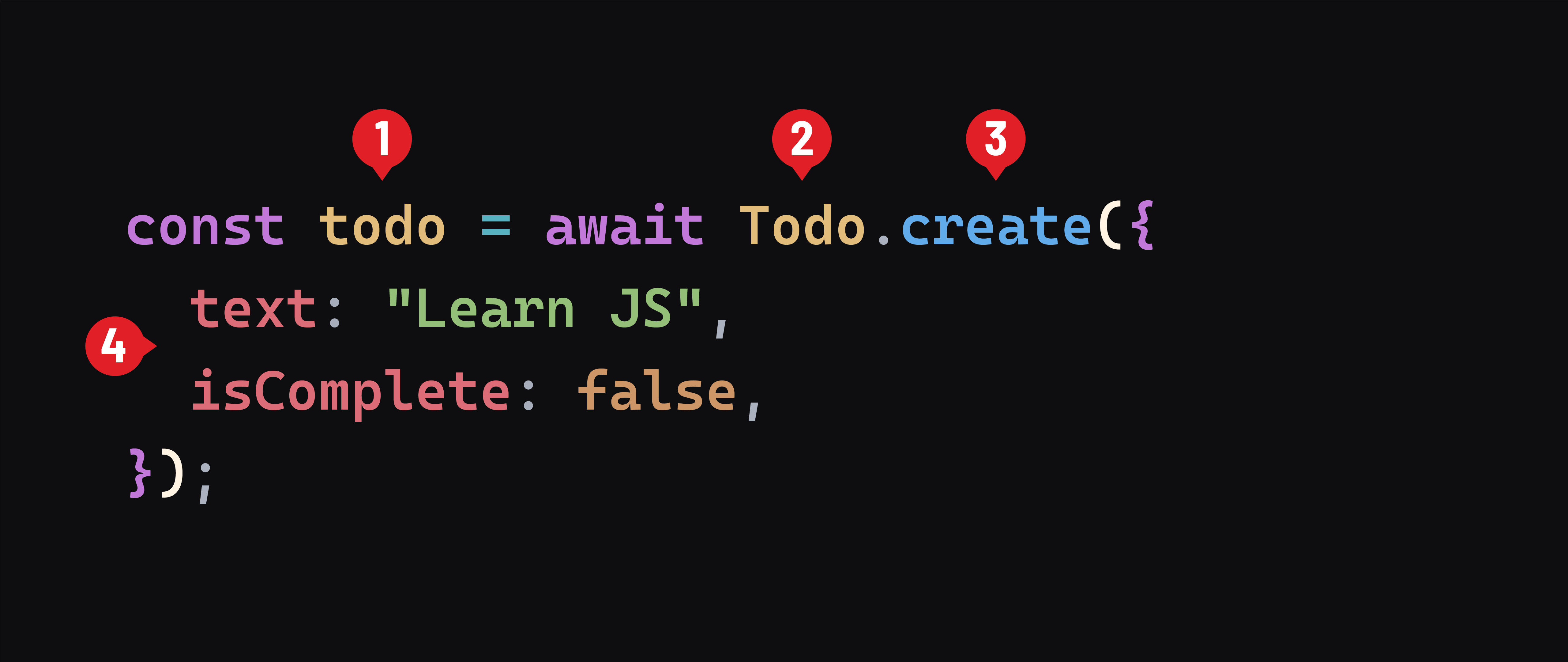
- Document Returned: The newly created document based on the schema.
- Model: The Mongoose model (
Todo) used for the operation. - Model Method: The
create()method of the model. - Object Argument: The data used to create the new document.
Creating a new todo
For this demonstration, we’ll work within queries.js. Our setup here differs from a typical Node/Express application to focus on gaining familiarity with Mongoose.
Import the model
Import the Todo model at the top of queries.js:
// queries.js
const Todo = require('./models/todo.js');
Build the createTodo function
Let’s build out a function to handle the creation of our new todo:
// queries.js

const createTodo = async () => {

  const todoData = {
    text: "Learn JS",
    isComplete: false,
  };

  const todo = await Todo.create(todoData);
  console.log("New todo:", todo);
};
Note: Data will typically arrive on the server via the
requestobject, but for this example, we’ve hard-coded some todo data in the function
In the createTodo function, we first define an object called todoData. It contains the details for our new todo. We then use the Todo model’s create() method to add this data as a document in the database. If the operation succeeds, the function outputs the newly created todo to the console.
Next, we’ll call createTodo within the runQueries function:
// queries.js
const runQueries = async () => {
  console.log('Queries running.');
  await createTodo();
};
Running the createTodo function
To execute the createTodo function, run the queries.js file with the following command:
node queries.js
Check your terminal for the following output:
New todo: {
  text: 'Learn JS',
  isComplete: false,
  _id: new ObjectId('65777e33f4a45a8462ae3054'),
  __v: 0
}
This output shows the newly created todo document. It includes the properties we specified, along with an automatically generated _id (a unique identifier assigned by MongoDB) and __v (a version key used to track how many updates have been made to the document).
💡 In Mongoose, every document automatically gets an
_idproperty, even if it’s not explicitly defined in the schema. This_idis a unique identifier generated by Mongoose using MongoDB’sObjectIdtype. It ensures that each document in the database has at least one unique property that we can use to easily find/update/delete it, without affecting other documents.
🎓 You Do
To add more todos, modify the todoData in createTodo and execute the queries.js file again.
Try to add todos for “Learn CSS” and “Learn HTML”