Intro to Express Express Middleware
Learning Objective: By the end of this lesson, students will understand the concept of middleware in Express and learn to implement the Morgan logging package to log route-related information.
Understanding middleware in Express
Middleware in Express is a powerful feature that acts as an intermediary between incoming HTTP requests and the routes that handle them. It’s a function that has access to the request object (req), the response object (res), and the next middleware function in the application’s request-response cycle. Middleware can execute code, modify request and response objects, end the request-response cycle, or call the next middleware in the stack.
The primary role of middleware is to intercept incoming requests and perform operations or run specific code before these requests are routed to their designated route handler functions. This allows developers to add functionalities such as logging, authentication, and request parsing to their Express applications.
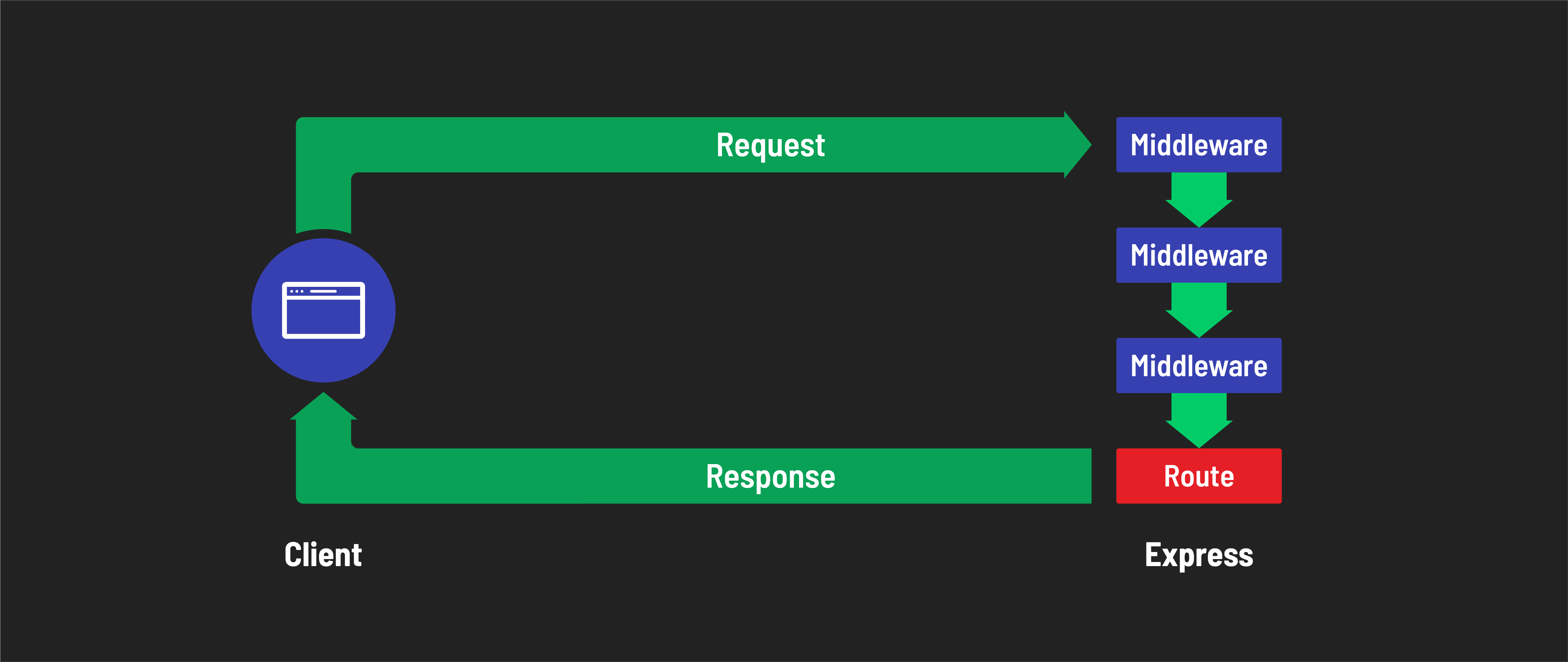
To practice implementing a middleware function, we’ll be downloading an NPM package called Morgan and using its built in methods to add functionality to our app.
Installing and using Morgan for logging
Morgan is a popular HTTP request logger middleware for Node.js. It simplifies the process of logging requests to your application, helping in debugging and monitoring. Put simply, when there is activity in your server (such as a browser making a request to a route) Morgan prints this activity to your terminal in real time.
Let’s try it!
Step 1: Install Morgan
If your server is running terminate that process now with Ctrl + C.
Now, add Morgan to your project:
npm install morgan
Step 2: Incorporate Morgan into your Express app
In your server.js file, require and use Morgan at the top of your file:
const express = require('express');
const morgan = require('morgan');

const app = express();

// Use Morgan middleware with the 'dev' option for concise output
app.use(morgan('dev'));

// Rest of your Express app code
The app.use(morgan('dev')) line tells Express to use Morgan as a middleware with the ‘dev’ format, which provides a concise colored output. Review the Morgan docs for more options for customization.
Step 3: Test a route
Restart your server:
nodemon
Test one of your existing routes in the browser to see Morgan in action:
app.get('/', (req, res) => {
  res.send('<h1>Hello Express!</h1>');
});
Visit localhost:3000/ in your browser.
Step 4: Check out Morgan’s logging
In your server’s console, you’ll see Morgan logging information about this request, such as the HTTP method, path, response status, and response time.
🎓 You Do
Test another route
- Choose another route from your server and test it in the browser.
- Observe the output from Morgan in your terminal. What information changes?
Implementing multiple middleware functions
Now you’ve seen what a pre-made middleware package can offer, but what if you need more custom middleware functions in your application?
In Express, middleware functions are incredibly versatile, allowing you to perform a variety of operations on incoming requests. This means you can add multiple middleware functions within a single application. This allows us to build a layered architecture, where each middleware function can perform its task independently and pass control to the next one in a sequence.
How multiple middleware functions work
- Next Function
next(): Middleware functions have access to anextfunction. Callingnext()within a middleware passes control to the next middleware function in the stack.
Example of using multiple middleware functions
In this example, the server runs two custom middleware functions before the request is passed to the route.
const express = require('express');
const app = express();

// First middleware function
app.use((req, res, next) => {
  console.log('Middleware 1: Logging request details');
  next(); // Pass control to the next middleware
});

// Second middleware function
app.use((req, res, next) => {
  console.log('Middleware 2: Performing some operation');
  next(); // Pass control to the next middleware
});

// Route handler as the final middleware
app.get('/', (req, res) => {
  res.send('<h1>Hello Express!</h1>');
});

app.listen(3000, () => {
  console.log('Listening on port 3000')
})
Test it out! Copy and paste the middleware functions into your own server, hit a route, and check the terminal output.
Key Takeaways
- Flexibility: You can insert as many middleware functions as needed, allowing flexibility in how you handle requests.
- Order Matters: The order in which middleware functions are declared is important, as it dictates the flow of request processing.