Intro to Asynchronous Programming
async/await
Learning objective: By the end of this lesson, students will understand how the async/await syntax applies to asynchronous operations in JavaScript.
Asynchronous code and the challenge with callbacks
Developers will often nest several functions in order to perform multiple asynchronous operations that depend on one another. However, when callbacks need to call functions that also accept callbacks, it leads to deeply nested structures. This is known as “callback hell” or the “pyramid of doom”. The resulting code becomes harder to read and more difficult to debug.
To see an example, let’s create two more files similar to the test.txt file we created before:
touch test2.txt test3.txt
Put the following content in test2.txt:
hello 2!
Repeat the process again with a test3.txt file:
hello 3!
Now let’s update app.js to print the contents of all of these files asynchronously:
const fs = require('node:fs');

fs.readFile('test.txt', 'utf8', (err, data) => {
  console.log(data);
  fs.readFile('test2.txt', 'utf8', (err2, data2) => {
    console.log(data2);
    fs.readFile('test3.txt', 'utf8', (err3, data3) => {
      console.log(data3);
    });
  });
});

console.log('run this as soon as possible');
Test the code!
node app.js
Now, imagine many more layers of this structure in a larger application. While it works as intended, this code leads to deeply nested functions that become difficult to read and maintain.
Introducing async/await
The async/await syntax is an alternate way of handling operations that don’t happen instantaneously.
📚 When the
asynckeyword is used when defining a function, it allows us to wait for an asynchronous operation to complete before executing more code in that function.This is accomplished by using the
awaitoperator. It pauses the execution of the rest of the code in a function until an asynchronous operation has finished. Theawaitoperator can only be used inside of anasyncfunction.Often, we don’t want to continue executing the code in a function until we have the results of what we’re waiting on. For example, if we’re requesting data from a database, we would want to ensure we’ve retrieved that data before trying to do something with it later in the function.
Anatomy of an async Function
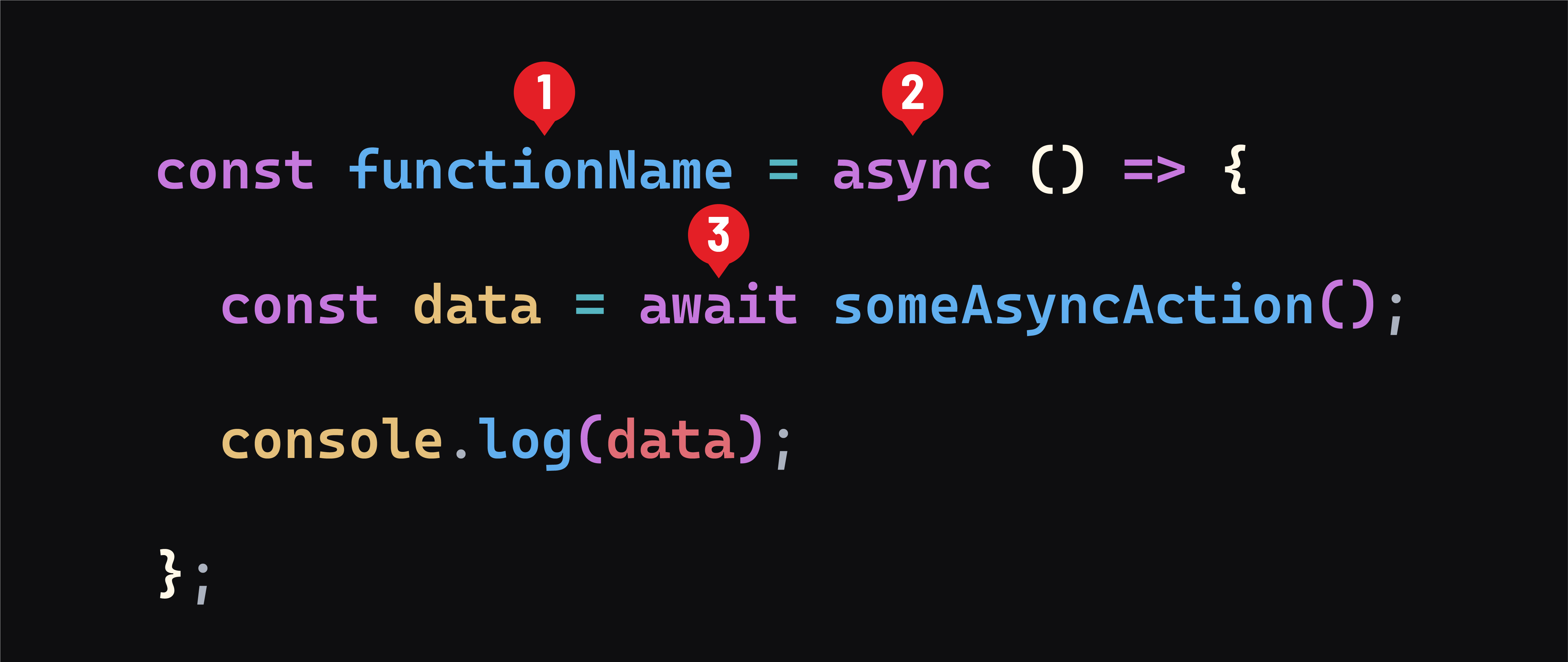
- Note
functionNamecould be anything, just like any other function. - Use the
asynckeyword immediately before the function definition. - Inside the asynchronous function, use
awaitto pause further execution until the asynchronous operation is complete.someAsyncAction()could be any asynchronous action.
Implementing async/await syntax
Let’s replace the callback-based file reading structure with async/await for cleaner code:
const fs = require('node:fs/promises');

const readDataFiles = async () => {
  const data = await fs.readFile('test.txt', 'utf8');
  console.log(data);
  const data2 = await fs.readFile('test2.txt', 'utf8');
  console.log(data2);
  const data3 = await fs.readFile('test3.txt', 'utf8');
  console.log(data3);
}

readDataFiles();

console.log('run this as soon as possible');
Test the code:
node app.js
What’s changed
-
We’ve changed the
requirestatement toconst fs = require('node:fs/promises');. This imports the promise-based variant of Node’sfsmodule. It’s designed to work withasync/awaitsyntax. -
We created an
asyncfunction namedreadDataFiles. -
Inside
readDataFiles(), we useawaitbefore eachfs.readFilecall. This pauses the function’s execution until each file read is complete, allowing the code to run line-by-line, similar to synchronous code. -
With
await,fs.readFiledirectly returns the file’s contents as a string. This allows us to assign the file’s content to variables (data,data2,data3) without callback functions. -
It’s important to note that you still see the text “run this as soon as possible” first. This behavior hasn’t changed.
Benefits of async/await
-
Readable code: Using
asyncandawaitmakes the code flow more like synchronous code, improving readability. -
Avoids callback hell: By using
await, we avoid nesting and make our code look more like a series of synchronous operations.