Hoot Back-End Setting the Stage
Learning objective: By the end of this lesson, students will understand the architecture and functional requirements of building a secure Express API for a blogging application, including user authentication and CRUD operations for blog posts and comments.
Overview
In this module, we’ll build an Express API that serves as the back-end for a full-stack blogging application called Hoot.
Within our Express API, we’ll implement full CRUD functionality on a blog post resource hoots. Additionally, we will implement create functionality on an embedded resource called comments.
Our Express API will make use of the Express API JWT Auth Template. This template provides our Express application with pre configured JWT Authentication. This style of authentication in HTTP uses tokens, or unique identifier strings, to tell who a user is when they’re making an authenticated request.
Thanks to this template, our Express application will already be able to sign up and sign in users. The template also includes a verifyToken middleware function. The verifyToken middleware ensures that any route following it in the middleware pipeline will require authentication before proceeding.
To demonstrate JWT Authentication, our Express application will use verifyToken to protect all routes related to the hoot resource. This means users will be required to sign in before getting access to any hoot data.
User Stories
Our Express API should include functionality for the following user stories:
- As a guest, I should be able to create an account.
- As a user with an account, I should be able to log in to my account.
- As a user, I should be able to create a hoot post.
- As a user, I should be able to read a list of all hoots.
- As a user, I should be able to view information about a single hoot post along with its associated comments.
- As a user, I should be able to add a comment to a specific hoot.
- As the author of a hoot, I should be able to update that hoot.
- As the author of a hoot, I should be able to delete that hoot.
User stories related to signing up and signing in have been completed for us in the Express API JWT Auth Template, but we will be implementing the remaining features from scratch.
Entity-Relationship Diagram
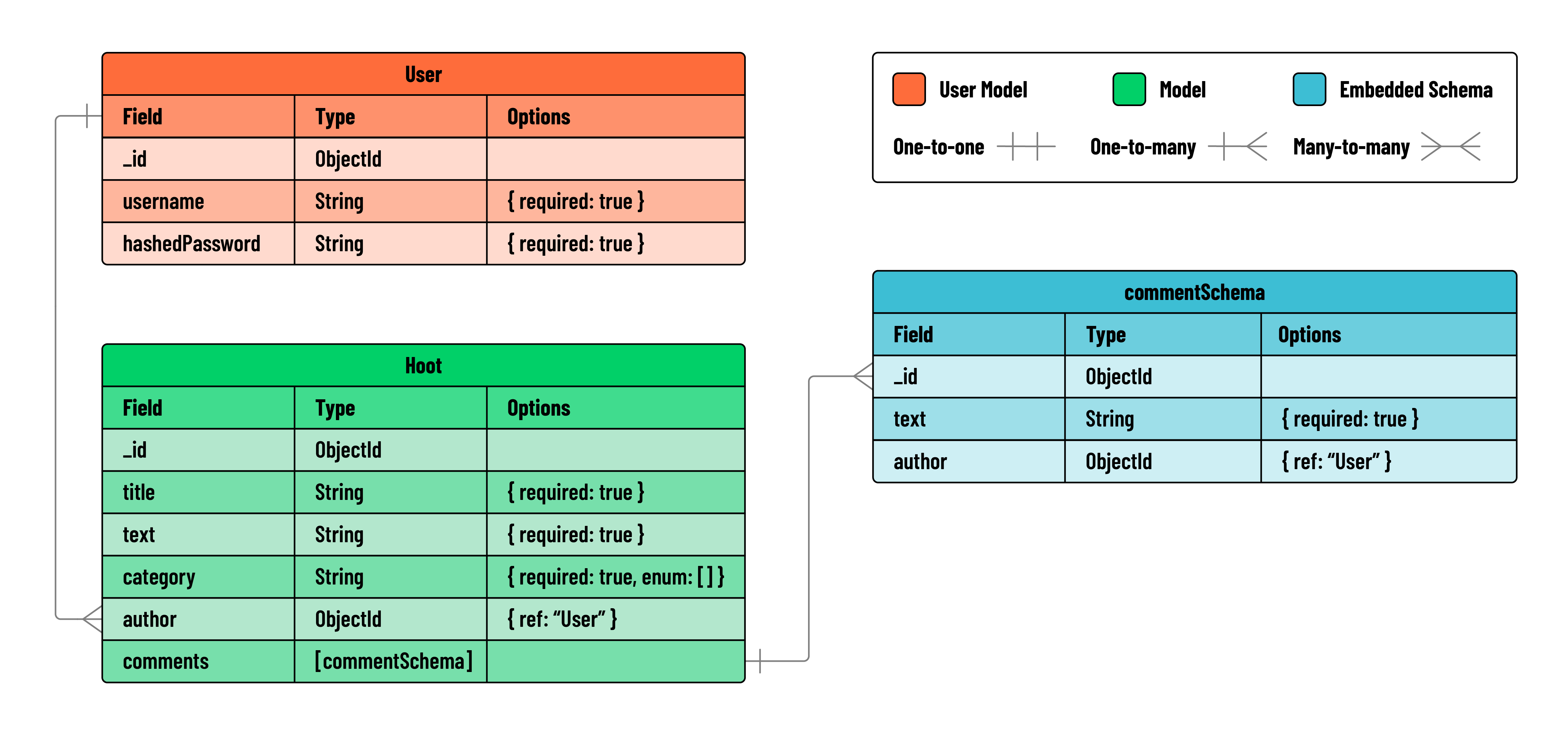
Take a look at the ERD below to get a sense of the data we’ll be working with:
Express & Postman
Below you can see a chart outlining the RESTful routes required for this application:
| HTTP Method | Controller | Response | URI | Use Case |
|---|---|---|---|---|
| POST | create | 200 | /hoots | Create a hoot |
| GET | index | 200 | /hoots | List hoots |
| GET | show | 200 | /hoots/:hootId | Get a single hoot |
| PUT | update | 200 | /hoots/:hootId | Update a hoot |
| DELETE | deleteHoot | 200 | /hoots/:hootId | Delete a hoot |
| POST | createComment | 200 | /hoots/:hootId/comments | Create a comment |
❗ Important: When testing these routes in Postman, make sure to enclose all JSON keys in the data payload (body) with double quotes (
"). JSON requires keys to be wrapped in double quotes to work correctly.