DOM Events Fundamentals
Learning objective: By the end of this lesson, students will be able to compose event listeners with appropriate syntax.
Listening to events
In JavaScript we use the addEventListener() method to attach event listeners to HTML elements in the DOM.
📚 An event listener is a function or piece of code in JavaScript that “listens” for specific events to occur on an HTML element, such as a click, mouseover, or keypress event. When the specified event happens, the event listener executes its associated code, allowing you to respond to user interactions and perform actions on your web page.
Here is the common syntax for doing this:
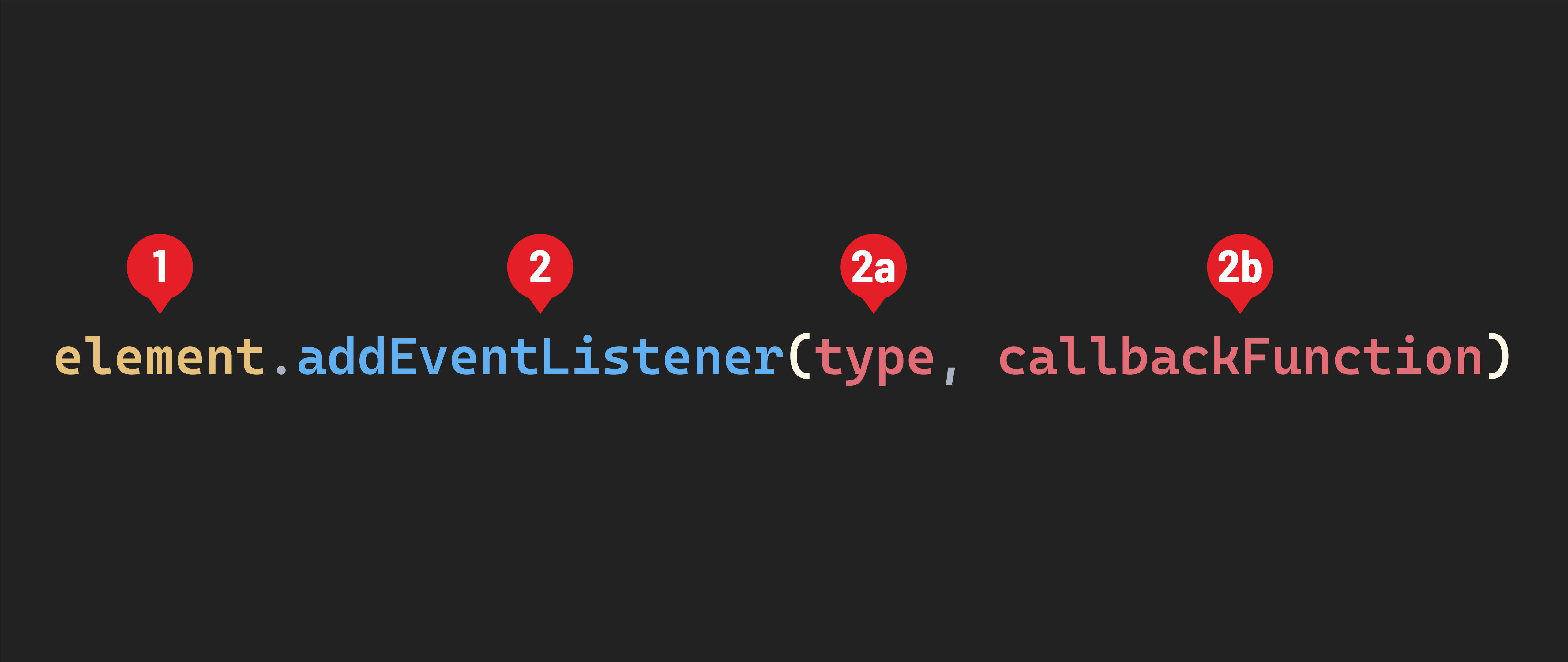
- The element we want to add an event to.
-
The
addEventListener()method. It accepts two arguments:2a. The
type. This should be a string and indicates the event that the event listener will respond to.2b. The
callbackFunction. ThecallbackFunctionis a function that will be executed when the eventtypewe’ve specified happens on theelementthat is listening for it.
As a reminder, a callback function is a function passed into another function as an argument. You might recall using callback functions with the
forEach()method. The callback function provided to theforEach()method is executed once for every item inside an array.
The callbackFunction above operates in a very similar way, but the code inside of it will be executed in response to an event triggered buy a user interaction.
♻️ Repeatable Pattern: When working directly with the DOM, we always use the
addEventListener()method to attach event listeners to elements.
The 'click' event
Let’s build an event listener that will respond to one of the most common types of events - the 'click' event. We’ll add this to the <button id="like-button"> element we created during setup.
An element receives a 'click' event when a mouse’s primary button is pressed and released on that item. Other pointing devices can also trigger a 'click' event, such as a finger tapping an element on a mobile device’s touch screen. For this lesson, let’s assume we are working with mouse clicks.
Let’s start by selecting the <button id="like-button"> element from the DOM and create a variable called likeButtonElement to keep track of it.
const likeButtonElement = document.querySelector('#like-button');

// let's log it to confirm
console.dir(likeButtonElement);
After you’ve confirmed that you’ve selected the <button id="like-button"> element from the DOM, you can remove the console.dir().
Now, let’s attach our first event listener to that element:
- To listen for a click event, we’ll use the
addEventListener()method and pass the string'click'as thetype. - Then we’ll write the callback function so that it logs the string
'You clicked me!'
likeButtonElement.addEventListener('click', () => {
  console.log('You clicked me!');
});
Return to your browser and open your DevTools. Click on the button element in the browser. You should see a message logged to the console: 'You clicked me!' - congrats! You’ve built your first event listener!